Why run AI locally · Part 4
Why do cloud AI limits and rules keep changing, and does local AI avoid that?
Cloud plans cap how much you can use and retire models on the provider’s schedule. A model on your own drive has no usage cap and stays the same until you change it.
We earn from qualifying purchases via affiliate links. Disclosure.
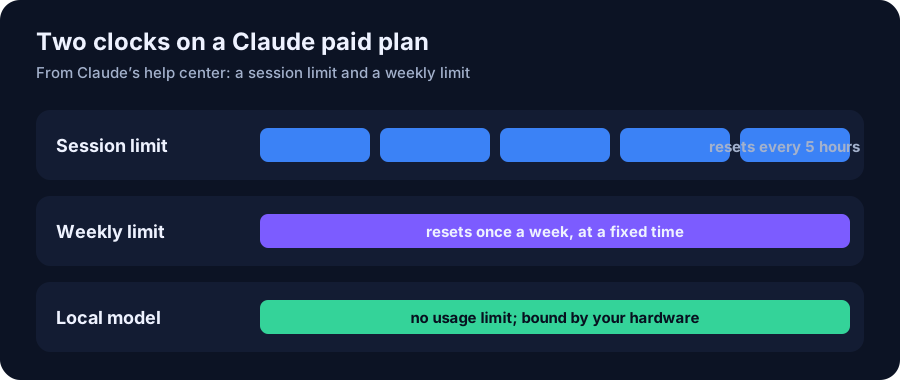
- Claude paid plans: a session limit that resets every five hours and a weekly limit (Anthropic).
- ChatGPT retired GPT-4o, GPT-4.1, GPT-4.1 mini and o4-mini on Feb 13, 2026, and GPT-5.1 models on Mar 11, 2026 (OpenAI).
- OpenAI’s API gives at least 6 months’ notice before retiring generally available models (OpenAI).
- A downloaded open model such as gpt-oss (Apache 2.0) keeps working the same way until you replace it.
Short answer: cloud AI runs on shared servers the provider pays for, so it rations use and replaces models as it releases new ones. Claude’s paid plans have a session limit that resets every five hours plus a weekly limit. OpenAI retired GPT-4o and several other models from ChatGPT on February 13, 2026. A local model avoids both: no usage cap beyond your hardware, and the model file on your drive doesn’t change unless you update it. The trade-off is that you also don’t get the newest models automatically.
Usage limits: how much you can use
Anthropic’s help center describes two clocks on paid Claude plans: “a session limit that resets every five hours, and weekly limits that reset once every week.” How fast you use them depends on message length, attachments, the model and features you pick. Usage in claude.ai, Claude Code and Claude Desktop all counts toward the same limit (Anthropic). The Pro plan page adds that Anthropic “may limit your usage in other ways, such as weekly and monthly caps or model and feature usage, at our discretion” (Anthropic). When you hit a limit you wait, upgrade, or pay extra with usage credits.
That isn’t unreasonable: the provider pays for the servers, and limits keep heavy users from crowding out everyone else. But it means the amount of AI you get for your $20 is set by someone else and can change.
Model retirements: what you can use
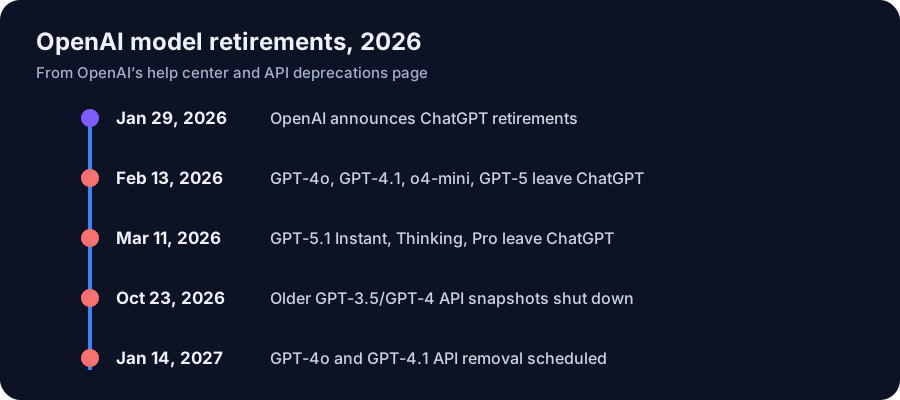
On January 29, 2026, OpenAI announced it would retire GPT-4o, GPT-4.1, GPT-4.1 mini and o4-mini from ChatGPT. That happened on February 13, 2026, and GPT-5.1 Instant, Thinking and Pro followed on March 11. Conversations and custom GPTs moved to newer models automatically (OpenAI Help). OpenAI’s announcement said only 0.1% of users were still choosing GPT-4o each day, and acknowledged that “losing access to GPT-4o will feel frustrating for some users” (OpenAI).
Developers get more notice. OpenAI’s deprecations page promises at least 6 months before retiring a generally available API model, at least 3 months for specialized variants, and possibly as little as 2 weeks for preview models. GPT-4o’s API snapshots are scheduled for removal on January 14, 2027 (OpenAI API).
If a workflow, prompt or tone you rely on depends on one specific model, a retirement can change your results overnight, even though the replacement is usually more capable.
Terms change too
Rules about data change on the provider’s schedule as well. In Part 1 we covered Anthropic’s 2025 consumer-terms update, which asked existing users to choose a training setting by October 8, 2025. Changes like that are normal for an online service, and they’re announced. But you don’t control the timing.
What stays fixed with a local model
- No usage cap. The only limits are your hardware’s memory and speed. Ollama queues requests when busy rather than metering them (Ollama FAQ).
- The model doesn’t change by itself. Ollama downloads a model when you run
ollama pull, and the file stays on your drive until you remove it (Ollama CLI docs). You can keep an older model next to a newer one and compare. - The license travels with the weights. gpt-oss 20B is released under Apache 2.0, a permissive license that allows commercial use (model card). Other open models have their own licenses, so check each one.
The trade-off, honestly
Stability cuts both ways. A cloud plan upgrades you to newer, better models without you doing anything; a local setup stays where you left it until you download something new. Local models are also smaller than the frontier cloud models (see Part 2). A sensible mix: keep a local model for everyday and repeatable work where consistency matters, and use a cloud plan for the hardest tasks.
To pick hardware with headroom for future models, start with What fits my memory, the 16 GB tier or the 64 GB unified tier. Llama 3.3 70B, for example, fits a 64 GB mini PC (see the fit).
Hardware in this article
ASUS Dual GeForce RTX 5060 Ti 16GB OC
Price shown at Amazon
Sold at Amazon.
Check price at Amazon (opens in a new tab)
Minisforum MS-S1 MAX 64GB / 2TB (Ryzen AI Max+ 395)
$2,599 Minisforum · checked Oct 27, 2026, 12:40 PM CT
Listed as available in the store data
Check price at Minisforum (opens in a new tab)FAQ
Does Claude Pro have usage limits?
Yes. Anthropic says paid plans have a session limit that resets every five hours and a weekly limit, and usage across claude.ai, Claude Code and Claude Desktop counts toward the same limit.
When was GPT-4o removed from ChatGPT?
February 13, 2026, along with GPT-4.1, GPT-4.1 mini and OpenAI o4-mini, per OpenAI’s help center. It remained in the API, with removal scheduled for January 14, 2027.
Does a local AI model have usage limits?
No usage cap. You can send as many requests as your hardware can process; Ollama queues requests when it is busy.
Will a downloaded model change without my permission?
Not in Ollama. A model is downloaded when you run ollama pull, and the file stays on your drive until you pull an update or remove it.
Keep reading
Sources
- Claude Help: How do usage and length limits work?
- Claude Help: What is the Pro plan?
- OpenAI Help: Retiring GPT-4o and other ChatGPT models
- OpenAI: Retiring GPT-4o, GPT-4.1, GPT-4.1 mini, and OpenAI o4-mini in ChatGPT
- OpenAI API: Deprecations
- Ollama FAQ (local mode, network binding, OLLAMA_NO_CLOUD)
- Ollama Docs: CLI reference
- Hugging Face: openai/gpt-oss-20b model card (Apache 2.0)